Desertcart purchases this item on your behalf and handles shipping, customs, and support to Malta.
🔥 Stay cool, stay ahead — build smart with Versa H21 🖤
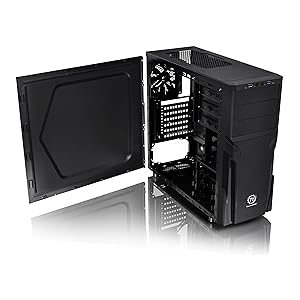
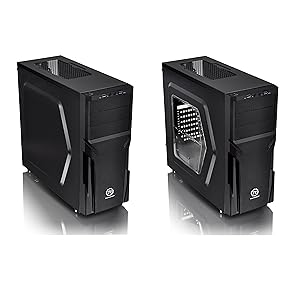
The Thermaltake Versa H21 is a sleek, budget-friendly ATX mid tower chassis designed for gamers and home builders seeking efficient airflow and versatile hardware support. Featuring perforated mesh panels for superior ventilation, tool-free front bezel access, and compatibility with a wide range of motherboards and cooling solutions, it balances practical design with essential connectivity including USB 3.0 ports. Ideal for those who prioritize function and quiet operation without the premium price tag.


| ASIN | B00J0NZ3Q4 |
| Antenna Location | Gaming |
| Best Sellers Rank | #40 in Computer Cases |
| Brand | Thermaltake |
| Built-In Media | Versa H21 Mid Tower Case |
| Case Type | Mid Tower |
| Color | Black |
| Compatible Devices | [A wide range of computer components and peripherals compatible with Mini ITX, Micro ATX, and ATX motherboards, and expansion standards] |
| Cooling Method | Air |
| Customer Reviews | 4.2 out of 5 stars 788 Reviews |
| Enclosure Material | secc |
| Fan Size | 12 centimeters |
| Global Trade Identification Number | 00841163054246 |
| Hard Disk Form Factor | 3.5 inches |
| Internal Bays Quantity | 6 |
| Item Dimensions D x W x H | 18.9"D x 8.23"W x 16.89"H |
| Item Weight | 9.3 pounds |
| Manufacturer | Thermaltake USA Direct |
| Material | secc |
| Mfr Part Number | CA-1B2-00M1NN-00 |
| Model Name | Versa H21 |
| Model Number | CA-1B2-00M1NN-00 |
| Motherboard Compatability | ATX |
| Number of Fans | 1 |
| Number of Items | 1 |
| Number of Packs | 1 |
| Other Special Features of the Product | Not_Performance_Used |
| Power Supply Mounting Type | Rear Mount |
| Recommended Uses For Product | Gaming |
| Supported Motherboard | ATX |
| Total Expansion Slots Quantity | 7 |
| Total USB 2.0 Ports | 1 |
| Total USB 3.0 Ports | 1 |
| Total Usb Ports | 2 |
| UPC | 350584834813 798813001504 809185333428 841163054246 809385182369 012304358152 863121544286 806293514329 803982760661 513560266910 807034591845 898029635965 846764214570 |
| Unit Count | 1 Count |
| Warranty Description | 3 years |
C**O
5 stars - rated within it's price point. Great for a simple build with direct front to back airflow.
Expectation management is important. If you're familiar with higher-end computer cases, you know you usually get what you pay for, such as: Thicker metal, no sharp edges, glass windows, robust accessory package, etc. Though this case has several water cooling radiator mounting options, I wouldn't build a higher end build in this case. This case is decidedly lower-end, befitting its' price point. But it is not "a cheap/junky case" and has several really good attributes. I'm using this case for a dedicated PC to connect a 3D scanner to. The case had to hold a mATX motherboard, a full size, 2-slot GPU and a full size ATX power supply and most importantly, stay cool while doing it. Pros: - Great airflow, front to back. f you tape over the vents on the top panel, you get excellent front to back airflow. I replaced the POS stock 120mm exhaust fan with a Noctua. - Case is only a midtower but it is fairly deep, especially considering the side panels which have bump-outs that give you about another 1/2" of CPU cooler height. I'm using a Noctua NH-D15 with 140mm fans and it barely fits. But it fits. Between the CPU HSF and the Noctua rear fan, my 5900x running at stock speeds stays under 40C under load, even in my hot garage. You can't hear the PC from more than a few feet away. - Three 5.25" bays! How many high end cases today have even one 5.25" bay? - Has basic cable management cutouts in the motherboard tray - Front bezel is toolless and has no wires attached to it, it just pops off. The USB ports and power buttons are part of the case body. The front bezel is it's own piece. This means you can clean the front dust filter while the computer is running. - Plenty of room for a larger ATX power supply - Plenty of standard locations for 3.5" and 2.5" drives. More than usual for a midtower - The PSU has a slide out dust filter that slides out from the back - QUIET. If you put a decent CPU HSF on your CPU and a quiet rear 120mm fan, the case is basically silent. - Metal edges and openings are rounded over. Not perfectly, but I didn't find any finger-chopping edges. Cons: - Case frame is steel, but it's really thin. This makes the case light but kind of flimsy, especially with the side panels off - No USB 3.2 on the front panel. Just old style USB3.0. - No front fans. Though you can physically fit two, 120mm fans behind the front bezel there is no way to mount them. There are no mounting holes. You'd have to drill your own. I think this is a design oversight. The depth for the fans is there. The bezel is plenty ventilated, but no way to mount front fans without modding the case. - Does not come with a way to seal off the vents/fan mount locations on the top panel. The inclusion of a cheap plastic panel that screws or snaps in would've been nice. I used black duct tape. The PC lives in my garage and I don't care that it has duct tape on it. You don't notice the black duct tape until you're right on top of the case anyway. - The front panel dust filter is under the front bezel and the filter is not removeable, it's part of the case structure, under the front bezel. To clean it, you need to pop off the front bezel (easy and fast) and vacuum the dust off the filter (pain in the butt) For my use case, I'm very happy with this case. If you're looking for an inexpensive case that will fit a mATX or ATX motherboard and you're not looking to water cool and don't care about RGB lights and such, and maybe need at least one 5.25" bay (but you get 3!), this is a really good option. I'd buy it again for a similar use case. It was a pleasant surprise.
R**S
For the price, really nice case!
As others have noted, stamped metal is thin, but for the price I have zero complaints. Well ventilated, decent options for mounting devices and running cables. Light weight (thin metal). I'm a realistic builder, been building PCs and working in IT since the 90s. If you value show over functionality, this may not be for you. I give zero F's about lights and looks - that said I think this case looks cool. Can't really lay this on the side. Power button is on top, so think about that if you have cats or kids.
J**M
good case
I can't believe some of the reviews. This case is a decent case and for the money one can't ask for much more. Do not believe people saying it bends and twist and is junk. It is not as well built as my 12 year old Thermaltake Gaming Tower. But I paid $180 dollars 12 years ago. Pro's: low cost, fits full size ATX boards, one of the only units left that has optical bays in. I refuse to give up on mine. MFG's and Windows wants everyone to be on the cloud and to download everything. When it all fails you pay for it all again, plus they have all of your DATA! I will keep my CD's and hard drives, thank you. Next I had no issues with the front panel mounting fans. I have built every pc that I have had for 35 years and know the layout very well. Cons: there are some but they are minor IMO from a full tower to this mid size, mounting space it a little tight I had to buy slim fans for a normal thickness 120mm would not fit on the top mounting bays without smashing the cables. The drive bay mounting units are flimsy but once you mount the SSD and or hard drives the stiffen up. Again kind of cheap but your spending 60 bucks not $200 The back tabs for the PCIE cards are a joke. My only real complaint! Come on man! You can buy a package of them for $6, instead they you have bend and twist the panel until it breaks out so you can mount your cards. And if you decide down the road to change out a slot you have to buy the fillers anyway. Next the side panel could of had a viewing panel instead it is a solid panel, no fan slot or plastic window. Happy gaming to all who buy this unit. Not the best but for the buck it is worth it and try to find one with all of the mounting slots and bays.
L**L
Inexpensive, but not cheaply made. 5 stars, considering its price-point.
For the price you pay, it gets 5 stars. This is not an expensive case, and it shows -- but they cut corners in all the right places. They don't include quite as many screws as more expensive cases do, but it's enough for most uses (as long as your power-supply comes with its own screws). And besides, what respectable computer-builder doesn't have a few spare computer-case screws lying around, just in case? They only include one expansion-card-slot cover, but I've seen plenty of more expensive cases that do the same. The metal is a bit thinner than what you'd get on a more expensive case, and there's no tempered glass -- but, again, you're saving a good deal of money here. The front-panel connectors all seem pretty sturdy, and are labeled well. There is no "basement" for the PSU -- the entire inside of the case is wide open, which means you have plenty of room to work in there, but it makes cable-management reminiscent of the early-2000s. But, again, you're getting what you pay for. One thing I was *very* happy with -- they did *not* leave the edges of metal parts sharp, where you can cut yourself while working in the case. There are far too many inexpensive cases that do this, and it's quite annoying, and potentially dangerous. This case does very well in that regard. The whole reason I bought it was because of the drive bays -- it's difficult to find any case these days with externally-exposed 5.25" drive bays, and this case has *three* of them! Plus 6 internal drive bays -- three 3.5" and three 2.5". Superb! If you're putting together a cheap NAS or some other server-type device where you don't have RGB to show off, and you don't need 1,500 watts of cooling (the biggest top-mounted radiator you can fit in here is 240mm), and/or you need to mount a ton of drives in here, this case is perfect.
D**N
Decent mid tower ATX
Full disclosure. Let me start off by saying, I don't like Thermaltake products since after the old ~2005 era Toughpower PSUs - you know the HEAVY ones. I had bought a new Smart 750 from Thermaltake (around 2016) who's SATA connectors destroyed three SATA 2.5" SSDs all at once. Thermaltake's response was more or less a shoulder shrug and an offer to replace my power supply (less than 6 months old). It actually fried the chip (burn marks) inside each of the three SSDs and they couldn't care less. So is my review of this case biased? You'll have to decide. ### CONS First, while the case in the pictures looks sturdy, it's only moderately so. As others before me have suggested, the material is thin. The case can twist a bit if forced. 9x standard ATX motherboard mount points are integrated into the fixed motherboard tray - you don't get to choose if you want them or not. Not that big of a deal, but I prefer the choice. 3x additional motherboard stand-off studs are included in my hardware package (for smaller motherboard screw placement) as well as screws to mount your motherboard (I had only 9 screws in my package for that). There were various other screws (probably for drive mounting, but I didn't use them) Let's start at the front. Nothing remarkable - 1x USB 2.0, 1x USB 3.0 (could have added an extra of each of those for better utility use), and mic/speaker ports are provided at the top front. A power and reset switch are positioned on the top of the case (at the front). The front bezel pops off to reveal a dust screen. The dust screen seems to be okay quality. This is where I ran into my first issue. The case specs said it supported 2x 120x120x25 front fans, but I could not find anywhere to screw them in and the instructions didn't say anything about this at all (only mentions the rear fan). I thought maybe I got a manufactured defective one. Then I read someone's review who said front fans didn't need any tools. That's when I went back and looked and I saw (2) 4x fan hold studs and some plastic clip hold-downs integrated on the dust screen that would fit 2x 120mm fans. I installed one Noctua 120mm fan at the bottom of the dust screen. It was a tight fit with the Noctua rubber corner grommets but it fit snuggly enough and I was able to snap the dust screen back into place, so I was satisfied. The case allows for easy routing of the fan cable through (behind) the hard drive cage. Moving inside. It comes with 3x 2.5" HDD and 3x 3.5" HDD toolless trays - the number of bays is the reason I bought this case over a Fractal Design Focus G. The 5 1/4" bays (3 of them) are also toolless, but I dropped a screw into those just to be safe. Here's where things get a bit tricky. First, if you have an aftermarket cooler that uses some other form of mounting other than the standard Intel/AMD mounting OEM fan solutions, I highly recommend that you install your CPU cooler first and connect the fan(s) now. I am using an ID Cooling SE-207-XT Slim and adding a fan over my RAM sticks (G.skill Ripjaws) causes the fan to stick right up to the 155mm height limit for CPU coolers imposed by this case. Next, if your motherboard 4 or 8 pin CPU connector is in the back, top corner of the motherboard, you really need to install that connector BEFORE you install your motherboard when using a large aftermarket cooler. There are no holes in the case that will facilitate routing the CPU power connector behind the motherboard tray. Once the motherboard is in, you will find it difficult later to install the CPU power connector, especially if you have giant Shrek hands like me and a large CPU cooler. Now here's where it gets interesting. I installed my PSU and the top case fan first. IMO, in order to install your CPU power connector safely, you should install your PSU first so it doesn't fall and yank on the motherboard by accident (that didn't happen to me, but I could see it happening to me sometimes the way I do things). I installed the PSU first and top case fan, then the CPU power connector and CPU fans. However, if you do this, make sure you have not installed any fans on the top of the case (which the case specs don't mention they exist, but you can install 2x 120mm fans on top - I don't think a 120mm or 240mm radiator liquid cooling solution would fit here, so only fans). I did install a single 120mm Noctua fan on top (towards the back of the case) and as a result, my standard ATX motherboard could not be installed because I could not angle/twist the board to get around the top case fan and the PSU with the large CPU cooler installed. What I did was remove the top case fan, then install the motherboard (ASUS B550 Tuff Wifi II). It was still tight, but it made it. Getting the 2x motherboard screws into the holes along the top of the case (by the motherboard shield and CPU cooler) would have been impossible without a screwdriver from iFixit that was magnetic so I could get those screws down in there. A carefully held and rotated screwdriver allowed me to tighten the screws down. Keep in mind, a standard ATX motherboard will fit, but it will be right up against your PSU and the top case fan(s). Then, once in, I had to carefully bend down/angle the 8pin CPU power connector wires, so that I could squeeze and gently force in the 120mm Noctua top fan into place. As others have said, the top fans are not really meant to be installed inside, but I am stubborn, and they were going inside no matter what. I made sure to connect my CPU cooler and CPU fan headers before I installed the motherboard. Make sure the CPU fan wires are not encroaching on the fan's domain. Let's finish up - the sides of the case are whole (not hole). There are no holes, no fan mounts, no windows on the case side panels. For me, that's okay. I'm building a 5700G proxmox server and I don't expect to push this to extremes. Final complaint, the rear included fan is only a 3 pin - could have been a 4 pin. ### PROS I like the hard drive and external drive bays - it was the number I was looking for (needed 3 external). I do like the compactness of it, just not what it takes to work around that. There are holes and cutouts throughout the inside of the case which makes for easy cable management and cable routing for almost all of your cable needs, to keep cables out of the main case cabin to facilitate better airflow and for a more clean look. Also, was very surprised to find generously long USB 3, USB 2, and audio front panel connectors. So many cases skimp on the length of these cables forcing you to run these cables right through your motherboard and GPU area and/or to put a lot of pressure and pull on your motherboard headers which I don't like. The USB 3 connector also was fairly flexible compared to other case USB 3 headers where the cable is VERY stiff and likely to break off of the motherboard header. The packaging also came with a couple of decent length tie straps for cable management. The side panel screws are thumb screws (which means you don't need tools to remove/replace the side panels). I like that. With a standard ATX, an LG DVD/Bluray drive, and a Kingston 3.5/2.5" single bay removable drive bay installs with room for the cables and my cooler. Lastly, the bottom of the case where your PSU goes has a dust screen opening for your PSU if you mount your PSU fan downwards that way. Bottom line, the case does (or will do) what I bought it for. It could be better like better quality it terms of sturdiness, motherboard mount flexibility, better front fan mounting solution, a bit more room on the top (like 1" would be sufficient I think), side window panel and fan mount, but all in all, a decent case for my needs. I would buy the case again for specific non-extreme uses, but exceeding that spec, you may want to look for another case if additional fans or liquid cooler are your preference. The case might be better suited for mini/micro ATX and ITX motherboards, but with patience and the right tools, you should be able to get the job done with a standard ATX.
P**R
Excellent case with plenty drive bays
I have built quite a few computers over the years. But I tend to gravitate towards inexpensive models because I have lots of left-over used parts. This case is very easy to work with, which will be configured as a NAS/server. So, room for drive bays is extremely important. Offerings nowadays tend to gear towards gaming with few or even no drive bays. For example, my main computer does not have a single drive bay. The need for a NAS is pretty clear. This case does not really have any fancy features. Fit and finish is fine, but do not buy it for look. Anyone with just a little bit of experience in putting together a computer can complete the installation in about an hour or two. The only item that requires some thinking is routing the wires and cables, but that should not take that much time even if you had to redo some. There is plenty of room inside, so air flow is very decent. I have no idea if you install a big/long video card; I am using it as a headless device, so no need for discrete video card. The only complaint I have is that the case only came with one fan in the back. I would have appreciated if a couple more fans are pre-installed on the top. But that is still only a minor issue. Overall, I am satisfied. Then factored in the cost, I think it is a very deal. Highly recommended.
F**Y
Great value!
I'm very happy with this case. I wanted to rebuild a system I had, which was in a prettier case, in order to get more drive bays. You can easily pay 5x as much for server-oriented cases. This is a budget case and looks like it, but I think the result is something of a "sleeper" -- it can house a better system than you would think, just from looking at it. I did put ARGB fans in it, and that creates a nice, subtle effect, even though there are no glass panels. I made use of the external drive bays to mount an old DVD drive that still works, along with some more USB ports. Another plus is size and weight. It is truly a mid-tower case, but it's a bit smaller and lighter than most. That's a real advantage, if you want to avoid the typical size and weight of most mid-tower cases available today. Here's the biggest down-side I ran into: my full-ATX motherboard fits tightly into the "upper left" corner (when looking at the board). That meant I couldn't pass cables through from that area to behind the board, making the main compartment messier in terms of cable management. The space behind the board is also pretty shallow. Fortunately the side panels are designed with bulges which save the day by making a little more room. Another disappointment was the poor attempt at toolless design for the internal drive bays. I would have much preferred simple bays that require screws on each side, rather than the plastic sleds which fit in somewhat sloppily. One more thing to be aware of: You might think that the radiator of a 240mm AIO could be mounted in the top, even though they don't say so. But that's unlikely to work. An ATX motherboard fits too high in the case for that to fit. Also, the screw hole locations wouldn't permit mounting my 240mm AIO at all. That vented top area is meant for mounting two 120mm fans, and you'll need to do just that, because other options for ventilation are limited. You can mount a single-fan AIO radiator in the back if you want to. I had a large, good-quality tower air cooler laying around, so I just used that. In spite of these negatives, like everyone else has said, it's a very satisfactory compromise between design and (quite low) price!
D**Z
Time has passed it by
I purchased this case because I wanted something cheap, with optical bays, without a glass section to do a new build using Intel's arrow lake. It even has some optional extras that I was not expecting: a dust filter on the bottom for the PSU air intake. And for the most part, the case delivers on those promises. There are some fit and finish problems that could have been avoided: The case is cheaply made - small manufacturing errors with the optical bay covers make it prohibitively difficult to actually slot a drive / some of the built in motherboard standoffs failed on gentle use / the pcie slot covers have to be bent out, and can leave behind razor sharp edges / The drive bays use plastic sleds with a latching mechanism that works based on the plastic deforming. As the plastic ages, snapping will become a concern. The case's design is not the best - the front panel can be removed, but there's no easy way to to remove the clips short of grasping the panel by the bottom and pulling hard. Those clips breaking is a matter of when, not if. / The top of the case, particularly the top left, is hard to get at and would be difficult to work in under the best of circumstances. The case is not exactly what was depicted. Amazon's current pictures for the item show no screw holes in the top grill (which would prevent mounting) and a very large hole below the motherboard tray (which would make cable management easy, if unsightly). Mine arrived with fan mounts, but with a much smaller set of holes for cables. The item depicted might just fit something like the Corsair shift series of psus. The item I received very much will not. All of that was not great, but the true problem is that the case's design philosophy has simply been surpassed by the times. Modern motherboards, with their large heat sinks and shrouds, are incredibly difficult to work on inside this case. If you add an a large cooler or radiator, the problem only compounds. And if you wish to add more fans (to better manage the heat of modern systems) things get worse yet (The cost of even mid-quality fan also destroys the value proposition of the case). Effectively, the build I have done in this case is immutable. Removing the board would require at at a minimum case fans, cooler fans, the cooler, optical bays, and the front panel. And the PSU should probably come out as well just to be safe. To sum up - I personally think there is much to like about the cases like this: simple, durable, and to the point. But the Thermaltake Versa H21 isn't even a particularly good example of its type. It is assembled somewhat poorly from cheap materials, and longevity is a real concern. When one factors in just how difficult it is to do a modern build in a case like this, I simply cannot recommend it. Unless you value your time very, very cheaply; I would steer away from this case.
B**Z
Thermaltake is dead.
I have just returned after a long term overseas contract and to save weight I left my Thermaltake Elements G case behind and just bought the mobo home to make a storage PC. The case is so cheap I thought I had been sent a Chinese no-brand case. Flimsy metal, cheap plastic HDD trays when we should be moving away from such materials, once you remove the rear close-outs and the 5.25 optical bay closures - you will never get them to fit back in as the tin foil metal bends irreparably. Also the numerous sharp edges from breaking out said closures cut your hand with annoying regularity. God how I wish I had bought mt Elements G case home - it was everything that this one is not. Buy a different brand as Thermaltake are no longer a quality manufacturer. If I could give this 0 stars, I would.
C**U
Buen producto
Gabinete de muy buenas características, lo que buscaba a parte de poder recibir una tarjeta ATX es que puedo utilizar también las bahías de 5.25
O**N
Great case and great value.
This is a great case and at $70 Canadian, a great value. It fits full sized ATX motherboards and 120mm custom CPU heat-sinks like the A40. With 3 HDD bays, 3 SSD bays, and 3 5.25" bays, all in a compact mid-tower 190mm wide case is brilliant. I'm not willing to give up the versatility of 5.25" bays for the flashy and impractical modern cases. This is a subtle and practical case. Only minor complaint is that there is no front intake fan. I also added wheels.
B**B
I Like It
Nice case, works for me.
W**L
Good basic budget case. Large leds.
Overall satisfied with the case. Purchased to build a basic pc, no gpu etc. Low price. There are lots of space for ssds and drives. The included case fan is quiet enough. The metal is on the thin side. The pet peeve for me is the drive active light, it’s fairly large and red, so it’s distracting.
Trustpilot
2 weeks ago
1 month ago