
DOWNLOAD THE APP


Customer Support

Desert Online General Trading LLC
Warehouse # 7, 4th Street, Umm Ramool, Dubai, 30183, Dubai
DOWNLOAD THE APP
Customer Support
Desert Online General Trading LLC
Warehouse # 7, 4th Street, Umm Ramool, Dubai, 30183, Dubai


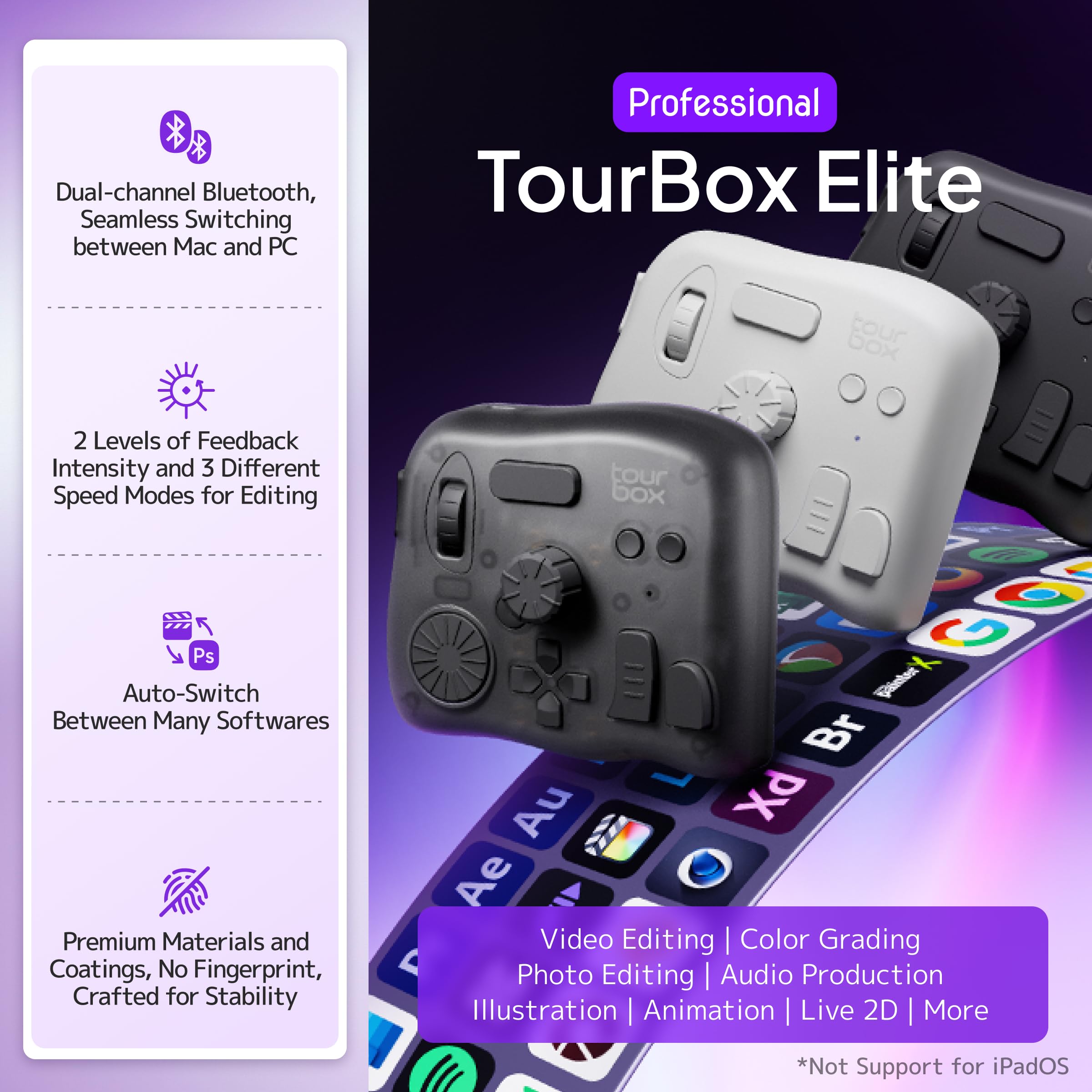


🎨 Edit smarter, not harder — unlock pro-level speed and style with TourBox Elite!
TourBox Elite is a professional-grade video editing and color grading controller featuring dual Bluetooth and USB-C connectivity, advanced haptic feedback, and a fully customizable interface. Designed for macOS and Windows, it supports a wide range of creative software, enabling one-handed, intuitive control that accelerates workflows for video editors, photographers, and digital artists alike.


| ASIN | B0B5XDTHR2 |
| Batteries | 2 AA batteries required. (included) |
| Best Sellers Rank | #180,853 in Industrial & Scientific ( See Top 100 in Industrial & Scientific ) #26 in Video Wall Controllers |
| Customer Reviews | 4.5 4.5 out of 5 stars (607) |
| Date First Available | July 31, 2022 |
| Is Discontinued By Manufacturer | No |
| Item Weight | 13.3 ounces |
| Item model number | Elite |
| Language | English |
| Manufacturer | TourBox Tech Inc. |
| Product Dimensions | 5.63 x 5.87 x 6.46 inches |
| UPC | 850040209136 |
I**D
Great device if you edit frequently - will reduce mouse clicks/movements
Full disclosure: This is a great device but I returned it. Why? Because as much as I would like to take and edit pictures all the time, the reality is that I don’t do so weekly so the learning curve and muscle memory is more difficult. Is this an amazing device that makes your editing workflow easier? Absolutely! Is it customizable? Absolutely! Then why did I return it? Only because I’m not using it weekly so I’m not able to remember all of the programmed functions without thinking about it and without repeated use I can’t get the muscle memory down. However, if you edit photos all the time rather than every few weeks, you will be able to use this device without thinking. I’m a gadget guy but this is more than a gadget - it really does make the workflow easier with fewer mouse clicks/movements. So, if you edit all the time or spend hours during each editing session even if you don’t edit all the time, this device is highly recommended. Perhaps when i retire in a few years and spend more time taking photos (my passion and zen), I’ll get the latest version of it!
C**S
Knocked out of the park
I've been editing, doing motion gfx in both After Effects and Cinema 4D for 15-20 years now. I've bought a ridiculous amounts of gadgets to "speed up" my workflow. While all fun to toy with at first, I quickly realized how my muscle memory of keyboard and mouse greatly trumped the speed I thought that was giving me. (Looking at you Loupedeck, 3DConnexion Mouse etc). That was, until I got the Tourbox. While difficult at first to train my brain, I found that I very quickly acclimated to the button shortcuts. I can also quickly jump between Photoshop, After Effects, Premiere etc and the new presets instantly pop up for that respective program. I do wish they had an english preset "pack" for After Effects on Mac. So I had to create one from scratch. A bit annoying, but luckily only had to do once. Its extremely well built and feels solid. Every button has its own sound AND feel, so you get multiple levels of feedback to know what you're pressing without looking down. I thought the TourBox looked sort of silly at first - almost like one of those fidget gadgets, but realized after using it that having every button look AND feel different was purposeful. But I gotta say, it's quite satisfying to click the buttons. Downside is the unbelievable decision to use AA batteries. Beyond me why they don't use a rechargeable Li-ion battery. So I end up just keeping it plugged in and not even using the Bluetooth. I feel like I could very easily walk away at night, leaving it switched on, to come back the next day with the expensive batteries drained. I would still get the Elite version for the haptic feedback which you can really feel. Other thing I found odd - the TourBox console does NOT show up as an open program when switching programs on my mac. So if I wanted to quickly Cmd+Tab to the Tourbox console program as I was setting up the profile, it did not show up and I had to manually minimize windows to find the TourBox console. Strange and pretty annoying - Attached photo of what I meant. Everyone's different, but for me, it was WELL worth it. It's simple, easy to set up, and just works great.
M**S
Worth the purchase!
This is a very nice device. I am only a beginner at drawing, but it works well with all the apps I use. Though the haptic feedback seems to be iffy right now... I need to look into this. I don't use it daily.
B**D
Not perfect, but you will still love it
The TourBox Pro is a great tool for video editing. Or really — if it’s not the TourBox, you’re probably going to want something similar, and chances are it’ll be more expensive. It’s a handy little controller that works well with most editing software. The included software is straightforward, and setting up custom profiles for apps like Camtasia was simple enough. It does take a little time to get used to if you’ve only ever worked with a mouse and keyboard, but once you do, it’s a noticeable time-saver. That said, it’s not perfect: Bluetooth on Windows is rough. I gave up on it pretty quickly because the connection would drop or the device wouldn’t get recognized. I just leave it wired in now. To be fair, Bluetooth on Windows has never been great, so your mileage may vary — especially if you’re on a Mac. The battery compartment on mine broke almost immediately. It’s purely cosmetic, and everything still works fine, but it’s a little frustrating when you like to keep your gear in good shape. Occasionally, the software stops working and needs a restart to reconnect with my editor. It’s rare, but it happens. Even with those quirks, I really like this thing. It’s well-built, has a good weight to it, and the controls feel great. Once you get used to it, it makes editing noticeably smoother. For the price, I think it’s worth it.
C**M
Turned out to be the perfect fit for my workflow
I'm a professional editor and have tried a ton of different peripherals to speed up my editing process. I tried the tourbox a year ago and ended up returning it to try some other options. Speed editors, jog wheels, stream deck, and most recently the Logitech Creative Console. I wasn't happy with these, and decided to try the tourbox again. It really is the perfect solution for my workflow. The Logi Creative Console doesn't integrate well with Davinci Resolve, and the tourbox has a great preset with tons of built in customization that allowed me to get up and running almost immediately. If I don't like a preset, I can very quickly change it out for something that works better using their software. The haptics are great for feedback when I need to scroll frame by frame, and feels great for those fine-tuned adjustments. Definitely not returning this one.
C**A
Es un dispositivo super útil para el flujo de trabajo en videos. Estoy muy contento con el producto y vale la pena la inversión. Es un dispositivo pesado, se siente de buena calidad y los botones vienen con pre ajustes que te facilita todo.
藤**井
Premiere Proで使用していますが、正直もっと早く買えばよかったと思えるレベルです。 特にタイムラインの移動やカット編集が圧倒的にスムーズになり、作業スピードが体感で2倍以上になりました。 ボタンのカスタマイズ性が高く、作業内容に応じて自分好みに割り当てられるのもポイント。 ダイヤルやノブの操作感もとても滑らかで、触っていてストレスがありません。 Bluetooth接続も安定していて、ラグもほぼ感じないです。 動画編を本気でやっている人には心からおすすめできます。「手がもう1本増えた」感覚を味わえます!
A**R
I like this so much that this is my second unit
M**U
High-quality materials and construction, very heavy-weighted so it stays in place on the desk and feels solid. Haptic feedback is appreciated for feeling the dials' notches (and can be adjusted per button/dial mapping), but if you don't need that or Bluetooth connectivity, get the lower tier model. I love the concept of all buttons/dials having different shapes, positions and surfaces, it makes them all so much more unique and memorable. The TourBox Console companion app for configuring button/dial bindings is extremely well designed and easy to use. I love the fact that I can associate actions with pretty much any combination of buttons and dials, so I can get pretty creative on how I set it up for each application, and I don't feel like I can run out of mapping possibilities. That was a big criteria for me and they scored 100% there. I'm using it in Ableton Live (for audio editing and music composition), in Blender (especially for 3D sculpting) and in Affinity Photo (for hand drawing) as a complement to my Kamvas Pro pen tablet (which was bundled with Huion's Keydial Mini, but that just can't compare to the TourBox, given its even grid of similar buttons). The only downside is the price. It is slightly overpriced compared to other hardware of similar complexity (game controllers, keyboards, mice, etc), but I guess that being targeted to a rather narrow professional audience, it's probably something to expect. But even if it's rather expensive, I don't regret my purchase at all and would buy it again any time if I had to. Highly recommended to anyone involved with creative apps and workflows, with so many keyboard shortcuts to remember and trigger.
T**Y
Premiere Proでの動画編集作業が多く、作業効率化のために購入しました。 Bluetoothの無線接続が非常に快適で、デスク周りがスッキリします。2台同時接続機能でMacとWindows機を切り替えながら使えるのも便利。 触覚フィードバックが絶妙で、ダイヤルやボタンの操作感が気持ち良いです。カット、カラコレ、音量調整などの頻繁に使う機能をワンタッチで実行できるようになり、作業スピードが格段に上がりました。 各ソフトウェアへの対応も素晴らしく、LightroomやDaVinci Resolveでもプリセットが用意されているので設定に手間がかかりません。 バッテリー持ちも良好で、丸一日使っても問題なし。 価格は決して安くありませんが、時短効果を考えれば十分元は取れます。本格的にクリエイティブ作業をする方には投資価値のある製品です。
Trustpilot
1 month ago
3 weeks ago