


🖥️ Elevate your multi-screen game with vertical clarity that commands attention!
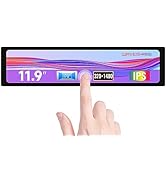
The Waveshare 8.8-inch IPS Side Monitor delivers a unique ultra-tall 480×1920 resolution display with a wide 170° viewing angle and built-in HiFi speaker. Compatible with all Raspberry Pi versions, Jetson Nano, and Windows PCs, it offers driver-free plug-and-play convenience. Designed for professionals craving efficient multitasking and sleek desk setups, this compact monitor transforms your workspace into a productivity powerhouse.










| ASIN | B09JP2565M |
| Are Batteries Included | No |
| Best Sellers Rank | 106,964 in Computers & Accessories ( See Top 100 in Computers & Accessories ) 1,692 in Monitors |
| Brand | Waveshare |
| Colour | 8.8 inch side monitor |
| Customer Reviews | 3.9 3.9 out of 5 stars (155) |
| Date First Available | 22 Oct. 2021 |
| Guaranteed software updates until | unknown |
| Item Weight | 10 g |
| Item model number | 8.8inch Side Monitor |
| Manufacturer | Waveshare |
| Number of HDMI Ports | 1 |
| Number of USB 2.0 Ports | 1 |
| Product Dimensions | 15.2 x 230.6 x 74.69 cm; 10 g |
| Resolution | 480 x 1920 |
| Screen Resolution | 480 x 1920 |
| Series | 8.8inch Side Monitor |
| Standing screen display size | 8.8 Inches |
| Voltage | 5 Volts |
S**R
Amazing little Display!
Well I have tried a few displays in the past but this is by far the best one. The image is nice and crisp and I can see everything clear that I want to see. Would have been nice to have the power lead and the hdmi on the back but that's easily sorted with a right angle set of leads. A must have if your a tech geek and like keeping track of what's going on in the background.
B**B
nice customers service
yes i had problem with item but customers service fix it very fast thanks
X**R
No response after turning on
Just received the 8.8inch display. The box has been damaged which is never a great sign... the actual display looks like it's not been damaged but I Plugged the hdmi in and the usb. Pressed the power button and nothing, no response. And theirs no instructions that came in the box so I don't even know if I'm plugging it in right.
V**K
Good product
The case is solid , works realy well right out of the box i recommend getting 90 degree attachments if you want to make it look more clean. 4 starts only for the reason the hdmi wire is bulky and odd looking other than that you can get everything aftermarket if you want to get more nicer look.
D**E
Won't power on
Like a few others have said mine turned up dead, would not power on no matter how I powered it up, but the quality of the case is excellent, returned and ordered another to give a second chance, fingers crossed 🫰
G**N
Dead on Arrival
Sadly my unit was dead on arrival, like other reviews. The metal case itself is very well made with a nifty little kick stand, so I award it 1 star for that. I will be returning for a refund, as sadly I have no faith that a replacement will last...
J**E
Very well made
Very good quality well made fits perfectly where I wonted to use it 👌🏻
P**T
Great screen, high quality
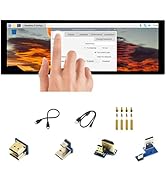
This screen is top quality. Yes, you’re paying more than for a screen on its own but the case is high quality, well made and has a brilliant little stand on the back. It comes with a flat HDMI cable and a decent length USB C cable. This is perfect for any streaming set up or if you just want to have a panel to monitor temps etc.
M**N
Gute Verarbeitungsqualität, und macht bis jetzt keine Probleme :)
J**G
Upon arrival dead, screen not even turning on
S**N
I've been in the market for a "mini display" for some time now. When I saw this unit, I decided to take a chance. I'm so glad i did! The screen feels well made, with a nice metal enclosure and strong kickstand. The ports feel nice and snug as well. The thing that really impressed me most of all was the quality of the display image itself. It's fantastic! I use it to stream videos and have messaging apps open while working on my 2 primary monitors. Given it's small size, this unit is very easy to transport too! For Windows users, just plug the device in. As long as you are connected to the internet the first time you do, the computer will automatically configure the display perfectly. For MacOS, it's tricky. I spent the better part of a day figuring out exactly what to do to make this work. Apple doesn't allow you to pick RGB output mode easily, so it appears pinkish at first. If this happens to you after initially plugging it in, do the following: To fix, simply run the following script: https://github.com/mlch911/one-key-hidpi Then select option 4: LG Display, and then option 3: Manual input resolution. then provide the resolution of 480 x1920. The script will insert an EDID override for this monitor into your MacOS Display override folder. Then just restart the mac and you are good to go! If you are still encountering any video issues, try using a different port. I ended up using an HDMI to USB-C cable for this unit and it works great. HDMI to HDMI did not. Youll only need to run this script *once*. Afterwords, the settings are saved and the monitor will be good to go. For me, this monitor is worth it. The quality of the item warrants the price the seller is charging, especially for the display quality. You really are getting your money's worth here. For those that want to know, the display mount I used is an AboveTEK Gooseneck Holder. It can be found on Amazon here: https://www.amazon.com/gp/product/B00X8C39J6/ref=ppx_yo_dt_b_asin_title_o08_s01?ie=UTF8&psc=1
D**I
plastik değil ,Metal çerçeve ,elinize alınca kalitesini hissediyorsunuz .Siyah çerçevelisi de olsaymış süper olurmuş.IPS ekran ,hoparlörü de var gerekirse diye ama %99 kullanılmaz.Arkadaki mandalı ayarlanabiliyor .
D**O
S’adapte parfaitement à mon simulateur simracing
Trustpilot
2 months ago
2 weeks ago


